DepositsBooked. Didn't show.
Booked. Didn't show.
Next time, take a deposit.
Set a deposit on a service. Customers pay by DuitNow QR when they book, and you confirm the booking in one tap.
Sign up free
No credit card
How it works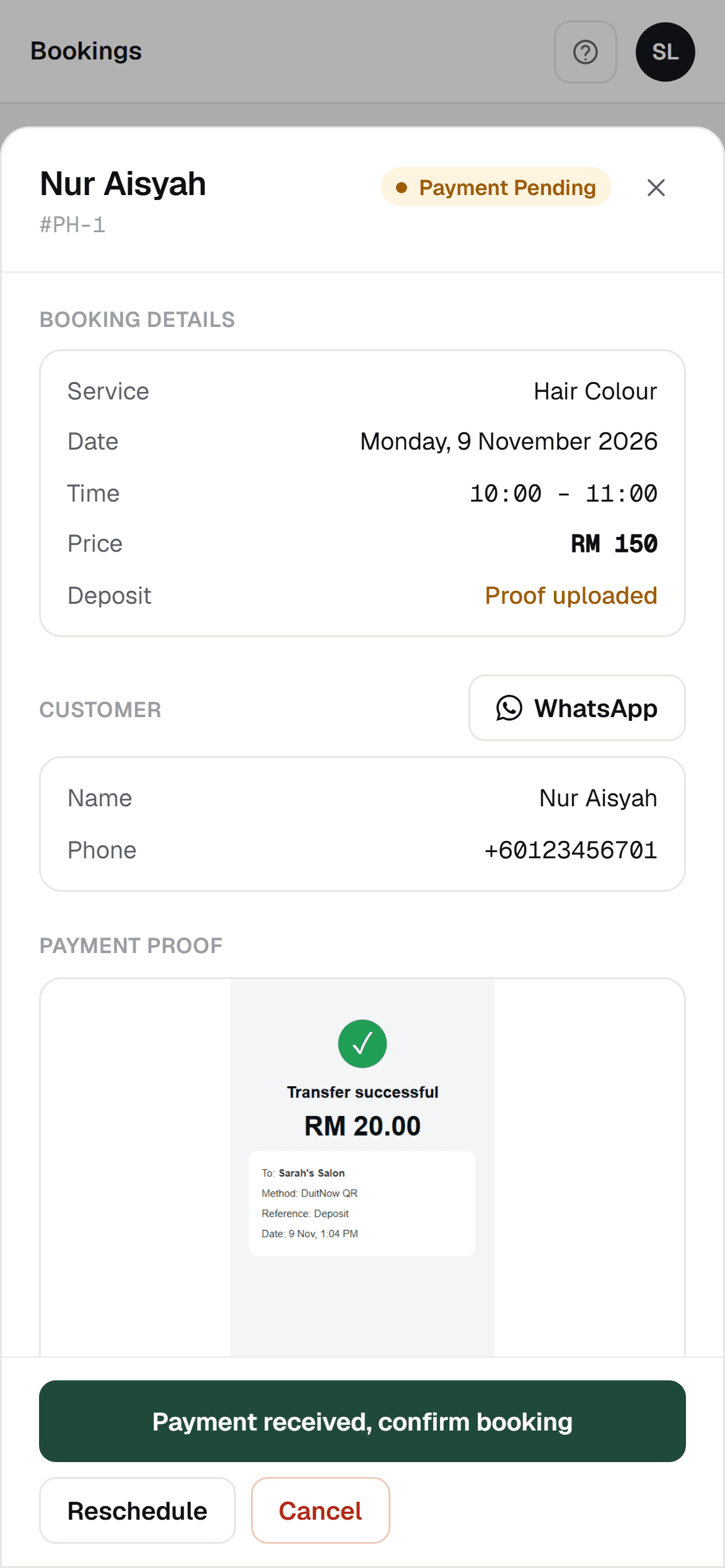
What you see on the booking. Sample booking with made-up details.
How deposits work
Set a deposit on a service
Choose the deposit amount for each service, and upload your own DuitNow QR.
Customer pays and uploads the screenshot
When they book, customers scan your DuitNow QR with their banking app, pay, and upload the payment screenshot.
Check your bank, tap once
You see the screenshot on the booking. Once the money is in your account, tap once to mark it paid and confirm the booking.
Good to know
Worth knowing before you start
A screenshot is not proof of payment
BookingLah does not check payments for you, and a screenshot is not proof the money arrived. Check your bank before you tap.
The money goes straight to you
Customers pay your own DuitNow QR. The deposit goes to your account, and BookingLah takes no cut.
You choose the amount
Set a different deposit for each service.
Deposits on every plan, including Free.
Free to start. No credit card.
Sign up free
No credit card